Workshops/Arduino Projects/Simon Says
Electronic simon says game with four (or more!) leds and buttons. The leds flash in a random order and the user has to push the buttons in the same order.
Extra Components
- 4x switches (+pull up resistors)
- 4x leds (+resistors to match)
Instructions
The circuit
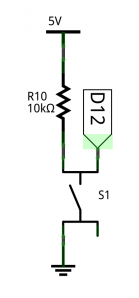
Switches
There are two basic ways to connect a switch as an input to an arduino,
The switches are connected as follows:
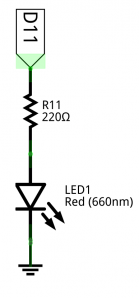
LEDs
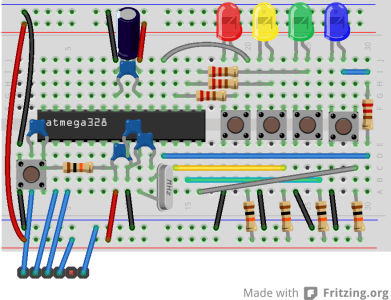
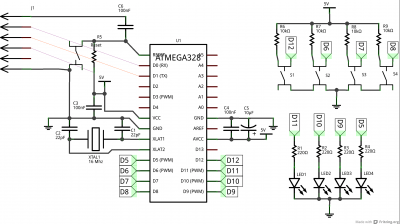
Complete Circuit
And here is the complete circuit:
Sketch
Right, now we need to program the game, lets start of with a basic sketch to ensure all the leds and buttons are wired up correctly:
int redledpin = 11;
int yellowledpin = 10;
int greenledpin = 9;
int blueledpin = 5;

int redswitchpin = 12;
int yellowswitchpin = 6;
int greenswitchpin = 7;
int blueswitchpin = 8;

/** The setup, this is called once when your sketch starts
 *  and should setup anything that your sketch needs. For now
 *  we just need to set the led pins to be outputs and the
 *  switch pins to be inputs
 */
void setup() {
    /* Sets up all the led pins to be outputs */
    pinMode(redledpin, OUTPUT);
    pinMode(yellowledpin, OUTPUT);
    pinMode(greenledpin, OUTPUT);
    pinMode(blueledpin, OUTPUT);

    /* Sets up all the switch pins to be inputs */
    pinMode(redswitchpin, INPUT);
    pinMode(yellowswitchpin, INPUT);
    pinMode(greenswitchpin, INPUT);
    pinMode(blueswitchpin, INPUT);
}

/** This is the main loop, it is repeatedly called after the setup
 *  has finished until the chip is reset or powered off.
void loop() {
    // Turns on an led when the matching button is pressed,
    // turns it off when it is not pressed.
    digitalWrite(redledpin, digitalRead(redswitchpin));
    digitalWrite(yellowledpin, digitalRead(yellowswitchpin));
    digitalWrite(greenledpin, digitalRead(greenswitchpin));
    digitalWrite(blueledpin, digitalRead(blueswitchpin));
}
Note that this code is not looking for when the button is pressed or released, it just sets each button to the state of the switch every loop iteration.
Extensions
| Fill me in: please help by filling this section in! |